
Download Emotimaker – Free Mac Icon Customizer & Smileys Creator
Overview
Emotimaker is a lightweight, trial‑version utility designed exclusively for macOS users who love to personalize their desktop experience with custom icons and smileys. First introduced to our software catalog in 2006, Emotimaker has accumulated 947 downloads to date, reflecting a niche but dedicated community of Mac enthusiasts. The current version, 1.0.3, was last updated on August 24 2006 and remains fully compatible with Mac OS X and earlier releases.
Though the program is offered only in English, its intuitive interface eliminates language barriers for anyone familiar with the classic Mac environment. Emotimaker occupies a modest amount of disk space, making it an ideal addition to the “Customize your Mac” category without bloating your system. Whether you are a graphic designer seeking a quick way to generate unique emoticons or a casual user wanting to replace default system icons with personalized graphics, Emotimaker provides a secure, hassle‑free solution that integrates seamlessly with the macOS workflow.
The software is distributed as a free trial, allowing you to explore its capabilities before deciding on a full purchase. Its primary purpose is to enable the creation, editing, and export of custom smileys that can be used across messaging apps, social media, and even within macOS itself, giving your digital communications a personal touch.
Key Features
- Custom Smiley Designer: Build smiley faces from scratch using vector‑based tools, layer effects, and a rich color palette.
- Icon Replacement Engine: Apply your newly created smileys directly to macOS icons, folder icons, and system shortcuts.
- Export Options: Save creations in PNG, ICNS, and SVG formats for maximum compatibility with apps and websites.
- Template Library: Start with a collection of pre‑designed smiley templates that can be modified to suit your style.
- Drag‑and‑Drop Interface: Quickly import images or existing icons into the editor without navigating through complex menus.
- Lightweight Footprint: Requires less than 15 MB of disk space and minimal RAM, ensuring smooth performance on older Mac hardware.
- Secure Trial Mode: All features are accessible during the trial period, with no hidden fees or mandatory upgrades.
- Regular Updates (Historical): Although the last official update was in 2006, the software remains stable on supported macOS versions.
Installation & Usage Guide
Step‑by‑Step Installation
1. Download the Installer: Click the “Download Emotimaker” button below to retrieve the .dmg file. The download is secure and free of adware.
2.
Mount the Disk Image: Double‑click the downloaded .dmg file; a virtual disk will appear on your desktop.
3. Copy to Applications: Drag the Emotimaker icon into your Applications folder. This ensures the app is available system‑wide.
4.
Launch the App: Open Emotimaker from the Applications folder or via Spotlight. macOS may ask you to confirm that you trust the developer; click “Open”.
5. Grant Permissions: The first run will request access to your Pictures folder for importing images. Approve the request to enable full functionality.
How to Design Your Own Smileys
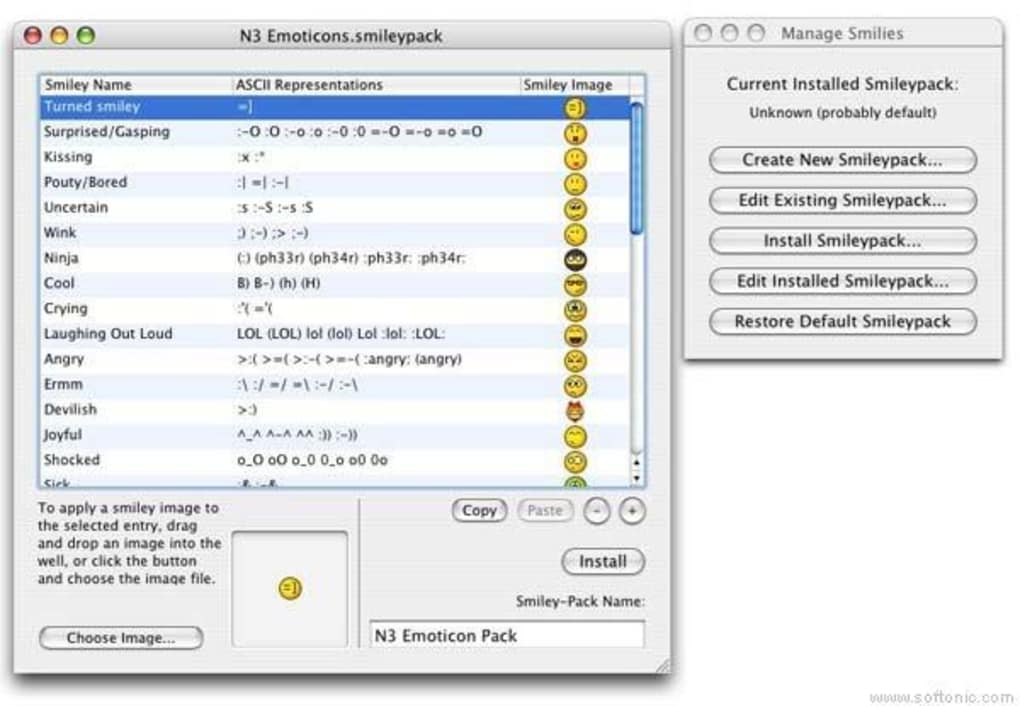
Once Emotimaker is open, you are greeted by a clean canvas with a toolbar at the top. Begin by selecting New Smiley from the File menu. Choose a base shape—circle, square, or free‑form—and adjust its size using the slider.
The color picker lets you apply gradients, solid fills, or transparency. Use the Eye and Mouth libraries to add expressive elements, or draw custom features with the brush tool. Layers can be reordered, hidden, or locked, giving you granular control over each component.
When satisfied, click Export and select the desired format (PNG for web use, ICNS for macOS icons). To replace a system icon, locate the target file in Finder, choose “Get Info”, click the small icon at the top left, and paste your newly created ICNS file. The changes appear instantly, providing a personalized visual cue for apps, folders, or documents.
Compatibility, Pros & Cons
System Compatibility
Emotimaker is built for macOS and supports the following versions:
- Mac OS X 10.4 (Tiger) through 10.6 (Snow Leopard)
- Legacy PowerPC and Intel architectures
- All English‑language installations
Pros
- Free trial with full feature access – no hidden costs.
- Very low system requirements; works on older Macs.
- Intuitive drag‑and‑drop workflow suitable for beginners.
- Multiple export formats for flexibility across platforms.
- Dedicated smiley templates speed up the design process.
Cons
- Last official update was in 2006; no recent bug‑fixes.
- Limited to macOS; no Windows, Android, or iOS version.
- English‑only interface may deter non‑English speakers.
- Trial version does not include a built‑in licensing manager for upgrades.
- Missing advanced animation tools found in modern icon creators.
Frequently Asked Questions
Is Emotimaker really free to download?
Yes. Emotimaker is offered as a free trial that provides access to all core features. There is no hidden charge for downloading or using the software during the trial period.
Can I use Emotimaker on macOS Big Sur or later?
Although Emotimaker was designed for OS X 10.4‑10.6, many users have reported that it runs in compatibility mode on newer macOS releases. However, Apple’s security policies may require you to allow the app in System Preferences → Security & Privacy.
What image formats can I export my smileys in?
Emotimaker supports PNG for web use, ICNS for macOS icons, and SVG for vector‑based workflows. This range ensures you can reuse your creations across different platforms.
Do I need an internet connection to use Emotimaker?
No. Once the application is installed, all design tools work offline. An internet connection is only required for the initial download and for checking for any future updates.
How do I replace a macOS system icon with a smiley created in Emotimaker?
Export your smiley as an ICNS file, then locate the target file or folder, open its “Get Info” window, click the small icon at the top left, and paste the new ICNS file. The system will instantly display the new icon.
Conclusion & Call to Action
Emotimaker stands out as a niche but powerful tool for Mac users who want to inject personality into their everyday computing environment. Its free trial, minimal system footprint, and straightforward smiley‑creation workflow make it an attractive option for both beginners and seasoned designers. While the lack of recent updates and the absence of Windows or mobile versions limit its reach, the core functionality remains solid for anyone focused on macOS customization. If you’re ready to craft unique emoticons, replace default icons, and give your Mac a fresh visual identity, click the download button below and start exploring Emotimaker today. Remember, the trial is completely free and secure—so there’s no risk in giving your Mac a smile!
Download Emotimaker NowEmotimaker delivers a surprisingly robust set of features for a free Mac‑only app. The ability to create custom smileys and instantly apply them as system icons is both fun and functional. Its lightweight design ensures smooth operation on older machines, and the drag‑and‑drop workflow is perfect for users without graphic‑design training. The main drawbacks are its dated interface and the fact that it hasn’t been updated in many years, which may cause compatibility hiccups on the latest macOS releases. Overall, for anyone looking to personalize their Mac without spending money, Emotimaker earns a solid four‑star rating.







